| Feature |
Description |
| Portal Name |
Parivahan Sewa. |
| Purpose |
Digitizes and simplifies road transport services in India. |
| Managed By |
Ministry of Road Transport and Highways (MoRTH). |
| Key Applications |
VAHAN (Vehicles), SARATHI (Driving Licenses), eCHALLAN (Fines). |
| Vehicle Services |
Registration, RC renewal, ownership transfer, road tax, NOC, fitness, PUC. |
| DL Services |
Learner's/Permanent DL application, renewal, duplicate, International Permit. |
| Other Services |
e-Challan payment, various permits, digital DL/RC via mParivahan app. |
| Benefits |
Convenience, transparency, less paperwork, faster processing, reduced RTO visits. |
| Official website |
Parivahan |
What is Parivahan Sewa Portal?
The Parivahan Sewa portal, accessible through parivahan.gov.in,
is an online platform that acts as a centralized hub for a wide range of vehicle and driving license-related services in India.
It integrates the databases of RTOs nationwide, offering a unified interface for citizens to manage their transport-related needs digitally.
The primary objective is to enhance efficiency, reduce paperwork, and provide a hassle-free experience for vehicle owners and drivers.
Features of Parivahan Sewa Portal
The Parivahan Sewa portal is equipped with several features designed to improve user experience and service delivery:
- Centralized Database: It connects RTOs across all states and Union Territories, providing a unified system for vehicle registration and driving license information.
- Online Application & Payment: Users can apply for various services, upload necessary documents, and pay fees online, eliminating the need for physical visits and cash transactions.
- Application Status Tracking: The portal allows applicants to track the real-time status of their applications, providing transparency and reducing uncertainty.
- Digital Document Storage (mParivahan App/DigiLocker Integration): While not directly on the Parivahan portal, it integrates with the mParivahan mobile app and DigiLocker, enabling users to store digital copies of their driving license and registration certificate, which are legally recognized.
- Information Accessibility: Citizens can easily access details about their vehicle registration, driving license, e-challans, and other relevant information.
- Appointment Booking: For services requiring physical presence (like driving tests or document verification), the portal facilitates online slot booking.
- User-Friendly Interface: The portal is designed to be intuitive and easy to navigate, even for individuals with limited technical knowledge.
- Transparency and Reduced Corruption: By digitizing processes, it aims to minimize human intervention and thus reduce opportunities for corruption.
Services Offered by Parivahan Sewa Portal
The Parivahan Sewa portal offers a comprehensive suite of services, broadly categorized into:
1. Driving License Related Services (Sarathi Portal):
- Application for Learner's License (LL)
- Application for Permanent Driving License (DL)
- Driving License Renewal
- Duplicate Driving License Application
- Change of Address in Driving License
- International Driving Permit Application
- Driving School License Application
- Online Test/Appointment Booking for LL and DL tests
- DL Extract (getting details of your DL)
2. Vehicle Related Services (Vahan Portal):
- New Vehicle Registration
- Vehicle Registration Renewal
- Transfer of Vehicle Ownership
- Hypothecation Addition/Termination (for vehicle loans)
- Duplicate Registration Certificate (RC) Application
- Change of Address in RC
- Fancy Number Booking
- NOC (No Objection Certificate) for Vehicle Transfer
- Permit Services (National Permit, Goods Carrier Permit, Passenger Carrier Permit etc.)
- Fitness Certificate (FC) application and renewal
- Road Tax Payment
- Vehicle Scrapping
3. e-Challan Services:
- Checking e-challan status
- Online e-challan payment
- Filing e-challan complaints
4. Other Services:
- Know Your Vehicle Details (RC details by vehicle number)
- Check Post Tax payment
- Dealer Point Registration
- Manufacturer Related Services
Eligibility Criteria for Driving License Application
To apply for a Driving License in India through Parivahan Sewa, certain eligibility criteria must be met:
Learner's License (LL):
- Age:
- 16 years for a motorcycle without gear (up to 50cc) with parental consent.
- 18 years for a motorcycle with gear and Light Motor Vehicle (LMV).
- 20 years for a commercial vehicle.
- Knowledge: Basic understanding of traffic rules and signs.
Permanent Driving License (DL):
- Must hold a valid Learner's License for at least 30 days and not more than 180 days.
- Must be proficient in driving the vehicle category applied for.
- Must pass the driving skill test.
- For commercial DL or applicants above 40 years, a valid medical certificate (Form 1A) is required.
- Should not be disqualified from driving.
Documents Required for Driving License Application
The documents required can vary slightly based on the type of license (Learner's or Permanent) and the specific state, but generally include:
Proof of Age:
- Birth Certificate
- School Leaving Certificate
- Passport
- Aadhaar Card
Proof of Address:
- Aadhaar Card
- Passport
- Voter ID
- Utility bills (electricity, water, gas - not older than 3 months)
- Rent Agreement (if applicable)
Proof of Identity:
- Aadhaar Card
- PAN Card
- Voter ID
- Passport
Other Documents:
- Form 1 (Self-declaration of physical fitness)
- Form 1A (Medical Certificate, mandatory for commercial vehicles or applicants above 40 years)
- Form 2 (Application for Learner's License)
- Form 4 (Application for Permanent Driving License)
- Passport-sized photographs (recent)
- Existing Learner's License (for permanent DL application)
- Application fee receipt.
- NOC (No Objection Certificate) if applying in a state other than where the previous license was issued.
- Driver Refresher Training Certificate (for heavy motor vehicles).
Driving License Application Process
The driving license application process typically involves two stages: Learner's License (LL) and Permanent Driving License (DL).
1. Learner's License Application:
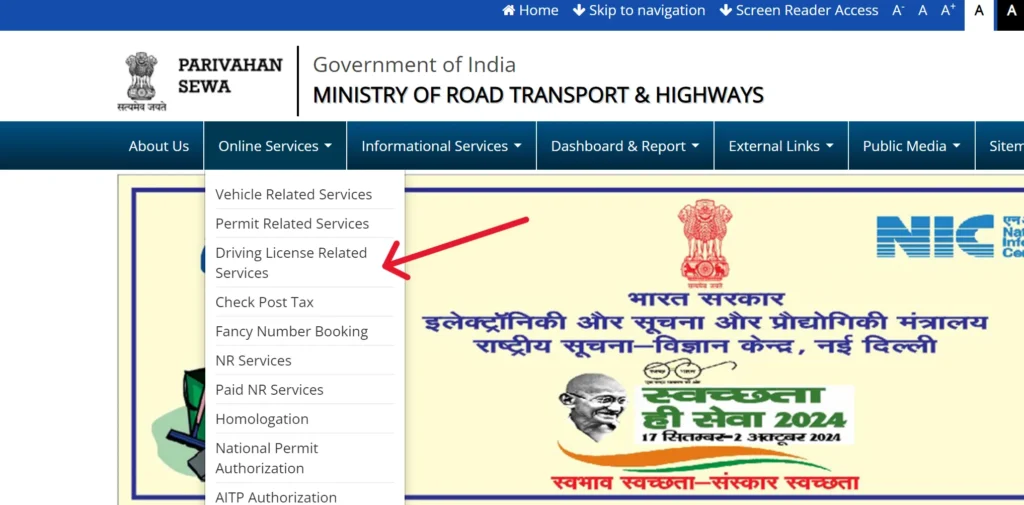
- Step 1: Visit Parivahan Sewa Portal: Go to parivahan.gov.in and select "Online Services" -> "Driving Licence Related Services".
- Step 2: Select State: Choose your state from the dropdown menu.
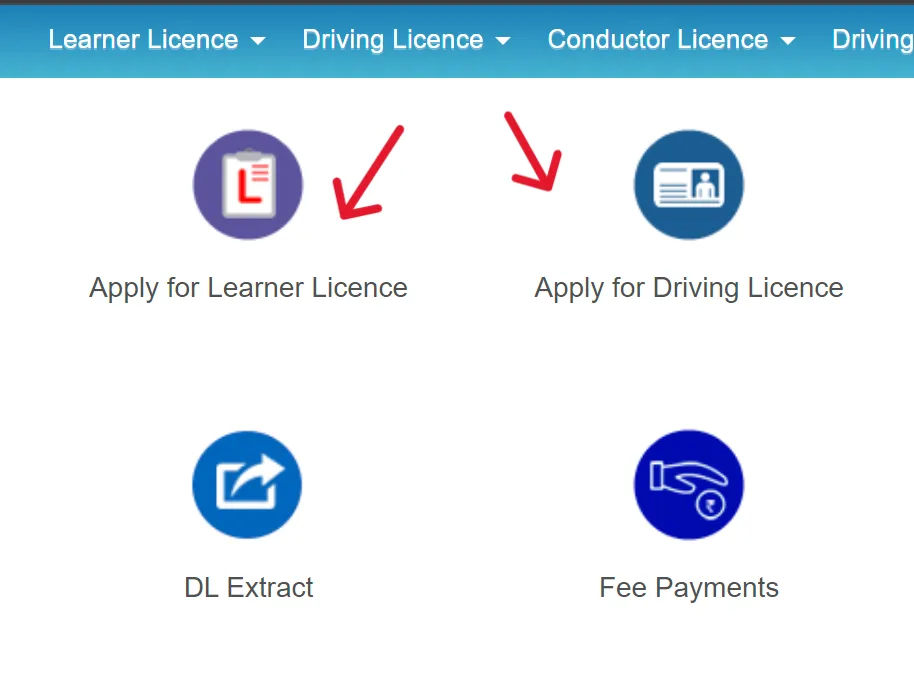
- Step 3: Apply for Learner's License: Click on "Apply for Learner Licence".
- Step 4: Fill Application Details: Fill in the application form (Form 2) with personal details, address, and vehicle class.
- Step 5: Upload Documents: Upload scanned copies of required documents (age proof, address proof, identity proof, Form 1/1A, passport-sized photo, signature). Ensure they meet the specified file size and format.
- Step 6: Pay Fees: Pay the application fee online through various payment gateways (net banking, debit/credit card, UPI).
- Step 7: Book Slot for LL Test: Schedule an online slot for the Learner's License test (theory test on traffic rules and signs). Some states allow immediate online tests.
- Step 8: Appear for LL Test: Take the computer-based test at the RTO or online as per the state's provision. A minimum score (usually 60%) is required to pass.
- Step 9: Receive LL: Upon passing, the Learner's License is usually generated and can be printed from the portal or received via post.
2. Permanent Driving License Application:
- Step 1: Wait for 30-180 Days: You must hold a Learner's License for at least 30 days and not more than 180 days before applying for a permanent DL.
- Step 2: Visit Parivahan Sewa Portal: Go to parivahan.gov.in and select "Online Services" -> "Driving Licence Related Services".
- Step 3: Select State: Choose your state.
- Step 4: Apply for Driving License: Click on "Apply for Driving Licence".
- Step 5: Fill Application Details: Fill out the application form (Form 4) with your Learner's License number and other details.
- Step 6: Upload Documents: Upload scanned copies of required documents (Learner's License, age proof, address proof, identity proof, Form 1/1A, photo, signature).
- Step 7: Pay Fees: Pay the application fee online.
- Step 8: Book Slot for DL Test: Schedule an appointment for the practical driving test at your nearest RTO.
- Step 9: Appear for DL Test: On the scheduled date, visit the RTO with your original documents and the vehicle for which you are seeking the license. The Motor Vehicle Inspector will conduct a practical driving test.
- Step 10: Receive DL: Upon successfully passing the driving test and document verification, your permanent driving license will be dispatched to your registered address or can be collected from the RTO within a specified timeframe.
Driving License Status Check
You can easily check the status of your driving license application or existing DL on the Parivahan Sewa portal:
- Step 1: Visit Parivahan Sewa Portal: Go to parivahan.gov.in and select "Online Services" -> "Driving Licence Related Services".
- Step 2: Select State: Choose your state.
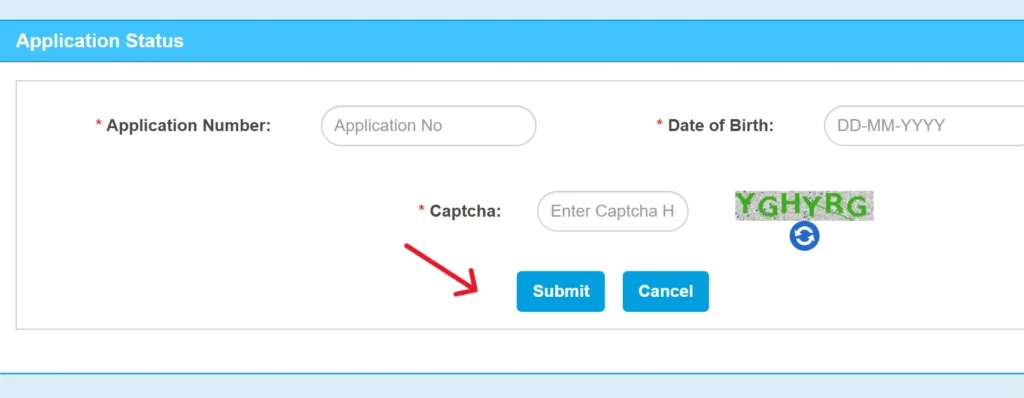
- Step 3: Click "Application Status": On the new page, click on the "Application Status" option.
- Step 4: Enter Details: Enter your Application Number, Date of Birth, and the Captcha code.
- Step 5: Submit: Click on "Submit" to view the current status of your application (e.g., under scrutiny, approved, dispatched).
You can also check your DL details using your DL number by navigating to "DL Search" under the "Others" menu in the Driving Licence Related Services section.
Driving License Download
While you typically receive a physical driving license, you can also download a digital copy from the Parivahan Sewa portal or integrated apps:
1. Via Parivahan Sewa Portal (for printing a copy):
- Step 1: Visit Parivahan Sewa Portal: Go to parivahan.gov.in and select "Online Services" -> "Driving Licence Related Services".
- Step 2: Select State: Choose your state.
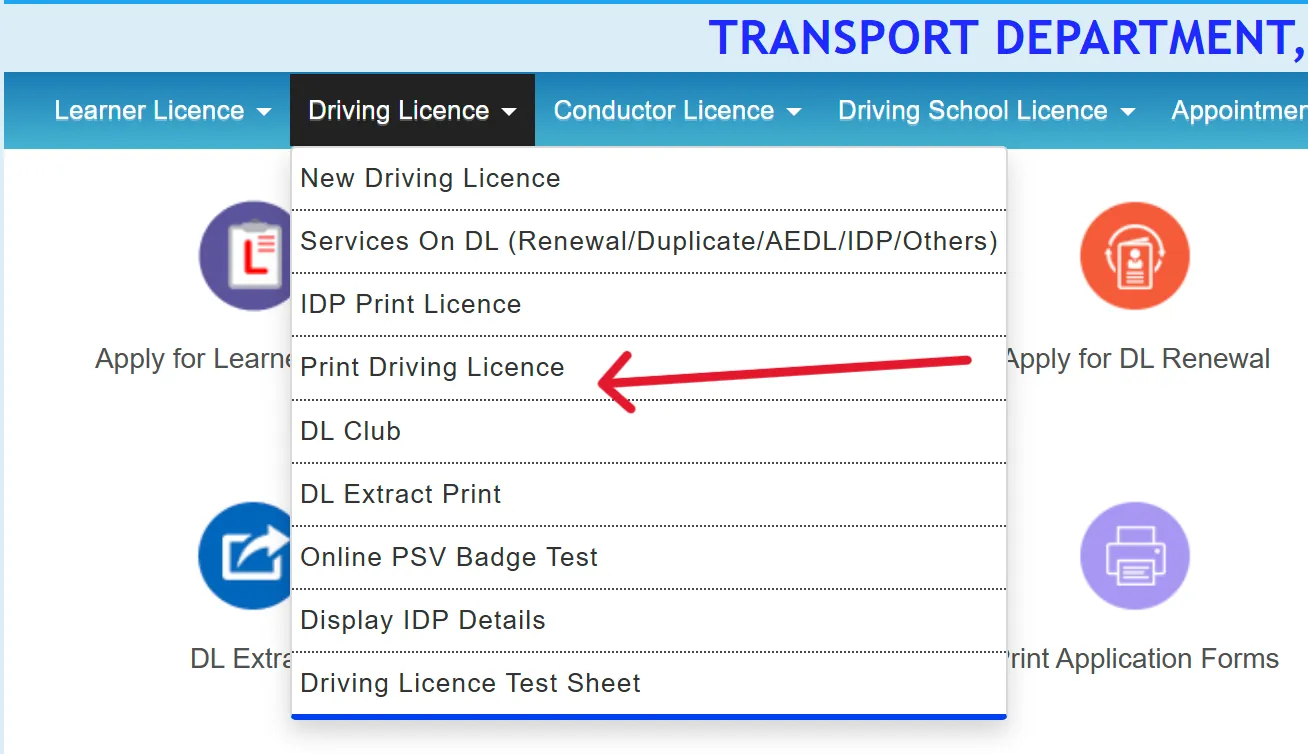
- Step 3: Click "Print Driving Licence": Under the "Driving Licence" dropdown menu, select "Print Driving Licence".
- Step 4: Enter Details: Enter your Application Number or Driving License Number and Date of Birth, along with the Captcha.
- Step 5: Submit and Print: Your license details will appear. You can then click on "Print" to download a PDF copy.
2. Via DigiLocker or mParivahan App (for digital copy):
- Step 1: Download App: Install the DigiLocker or mParivahan app from your app store.
- Step 2: Log In/Sign Up: Create an account or log in using your Aadhaar number or registered mobile number.
- Step 3: Link DL: Link your driving license by entering your DL number.
- Step 4: Access Digital DL: Your digital driving license will be available in the "Issued Documents" section. This digital copy is legally valid.
Driving Licence Fees in India
| Fee (₹) |
Service |
| 150 |
Issue of Learner's Licence (for each class of vehicle) |
| 50 |
Learner's Licence test fee or repeat test fee |
| 300 |
Test of competence to drive (for each class of vehicle) |
| 200 |
Issue of Driving Licence |
| 1,000 |
Issue of International Driving Permit (IDP) |
| 500 |
Addition of another class of vehicle to Driving Licence |
| 100 |
Endorsement or renewal of authorization for vehicles carrying hazardous goods |
| 200 |
Renewal of Driving Licence |
| 300 |
Renewal of Driving Licence (after grace period) |
| 10,000 |
Issue or renewal of licence to a driving school or establishment for imparting instructions in driving |
| 5,000 |
Issue of duplicate licence to a driving school or establishment for imparting instructions in driving |
| 500 |
Appeal against orders of licensing authority |
| 200 |
Any application for change in address or other particulars |
| Half of DL fees |
Conductor Licence fees |
| 200 |
Issue of Duplicate Driving Licence |
| 200 |
Smart Card Type Driving Licence (additional fee) |
Driving License Renewal
Driving licenses need to be renewed after their validity period (20 years or till the age of 50 for non-transport vehicles, and usually 3-5 years for commercial vehicles).
Eligibility: Your DL must not have expired for more than 5 years. If it has, you might need to apply for a fresh license.
Grace Period: There's a 30-day grace period after expiry during which you can renew without penalty. After 30 days, a late fee applies.
Documents Required:
- Original Driving License
- Form 9 (Application for Renewal of Driving License)
- Form 1 (Self-declaration of physical fitness) or Form 1A (Medical Certificate for commercial DL or applicants over 40)
- Proof of Age and Address (self-attested copies)
- Recent Passport-sized Photographs
- Renewal Fees
Online Renewal Process:
- Step 1: Visit Parivahan Sewa Portal: Go to parivahan.gov.in and select "Online Services" -> "Driving Licence Related Services".
- Step 2: Select State: Choose your state.
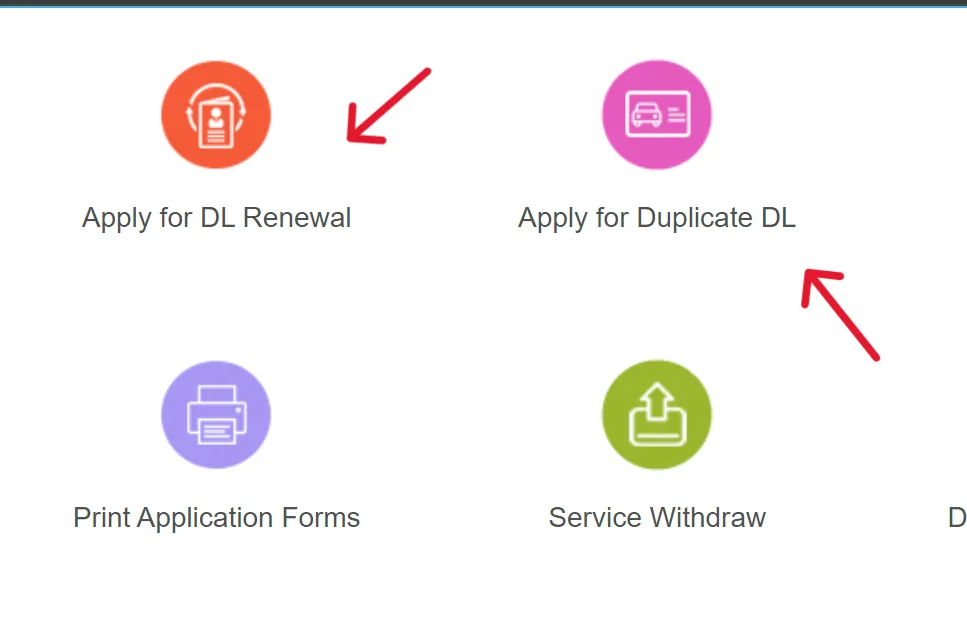
- Step 3: Apply for DL Renewal: Click on "Apply for DL Renewal".
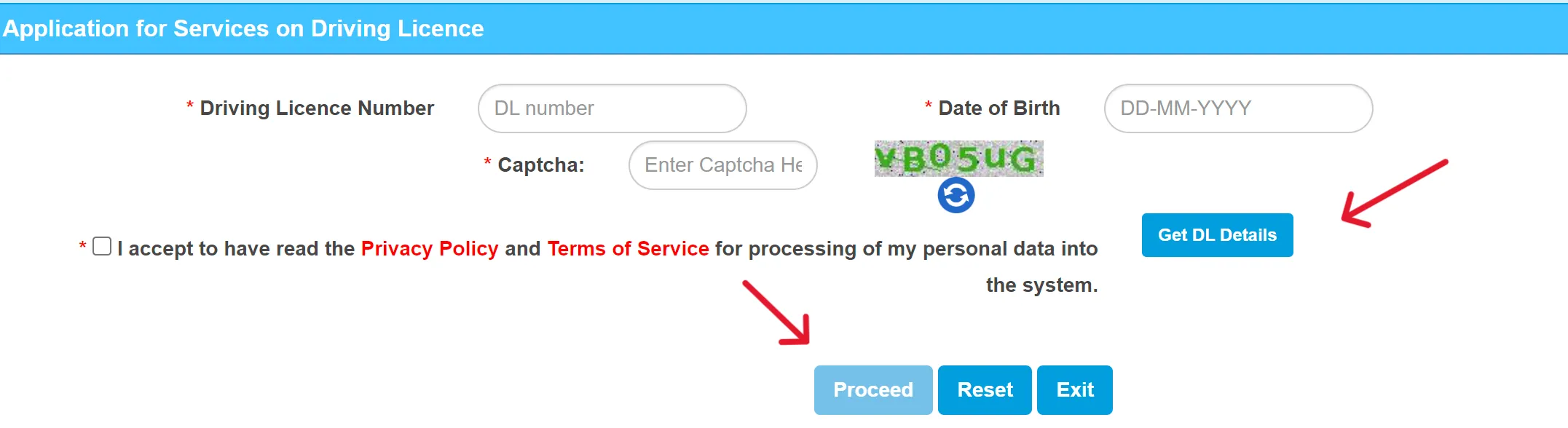
- Step 4: Enter DL Details: Provide your Driving License number, Date of Birth, and Captcha. Click "Get DL Details".
- Step 5: Fill Form & Upload Documents: Complete Form 9 and upload scanned copies of all required documents.
- Step 6: Pay Fees: Pay the renewal fee online.
- Step 7: Schedule RTO Appointment (if required): Some states may require an RTO visit for verification or a re-test if the license has expired for a long duration.
- Step 8: Receive Renewed DL: The renewed DL will be dispatched to your registered address.
Duplicate Driving License
A duplicate driving license can be applied for in cases of loss, theft, damage, or if the photograph needs replacement.
Eligibility: Your original DL must be valid.
Documents Required:
- Application Form LLD (for loss/destruction)
- FIR (First Information Report) copy, if the license is lost or stolen.
- Original License (if damaged/mutilated)
- Attested photocopies of the original DL (if lost and you have a copy).
- Passport-sized photographs.
- Proof of Address and Age.
- Challan clearance report (especially for commercial DLs).
- Prescribed fee.
Online Application Process:
- Step 1: Visit Parivahan Sewa Portal: Go to parivahan.gov.in and select "Online Services" -> "Driving Licence Related Services".
- Step 2: Select State: Choose your state.
- Step 3: Apply for Duplicate License: Click on "Apply for Duplicate DL".
- Step 4: Fill Details: Enter your DL number, date of birth, and other required details.
- Step 5: Upload Documents: Upload scanned copies of the required documents, including the FIR copy (if applicable).
- Step 6: Pay Fees: Pay the prescribed fee online.
- Step 7: Track Status: You can track the status of your duplicate DL application on the portal using your application number.
- Step 8: Receive Duplicate DL: The duplicate DL will be dispatched to your registered address.
Driving License Forms
| Form Number |
Description |
| Form 1 |
Self-declaration of physical fitness. |
| Form 1A |
Medical Certificate (required for commercial licenses, or for applicants aged 40 and above for non-transport licenses). |
| Form 2 |
Application for Learner's Licence, Driving Licence, renewal, duplicate, or adding a new class of vehicle. |
| Form 3 |
Learner's Licence (the actual document issued). |
| Form 4 |
Application for Permanent Driving Licence. |
| Form 5 |
Driving Certificate issued by a recognized driving school. |
| Form 7 |
Format of the Driving Licence (Smart Card/Laminated Card). |
| Form 8 |
Application for addition of a new class of vehicle to an existing Driving Licence. |
| Form 9 |
Application for renewal of Driving Licence. |
| Form L.L.D. |
Application for Duplicate Driving Licence. (Note: Linked to a state-specific but widely applicable form) |
Vehicle Related Forms
| Form Number |
Description |
| Form 20 |
Application for new vehicle registration. |
| Form 21 |
Vehicle Sale Certificate (from dealer). |
| Form 22 |
Certificate of Roadworthiness (from manufacturer). |
| Form 25 |
Application for Renewal of Registration Certificate (RC). |
| Form 26 |
Application for duplicate RC (if lost/damaged). |
| Form 27 |
Application for new registration mark (inter-state vehicle transfer). |
| Form 28 |
Application for No Objection Certificate (NOC) for vehicle transfer. |
| Form 29 |
Notice of Vehicle Ownership Transfer (by seller). |
| Form 30 |
Application for Vehicle Ownership Transfer (by buyer). |
| Form 31 |
Ownership transfer upon owner's death. |
| Form 32 |
Ownership transfer for vehicles bought in public auction. |
| Form 33 |
Intimation of change of address in RC. |
| Form 34 |
Entry of Hire-Purchase/Lease/Hypothecation agreement (vehicle loan). |
| Form 35 |
Termination of Hire-Purchase/Lease/Hypothecation (loan paid off). |
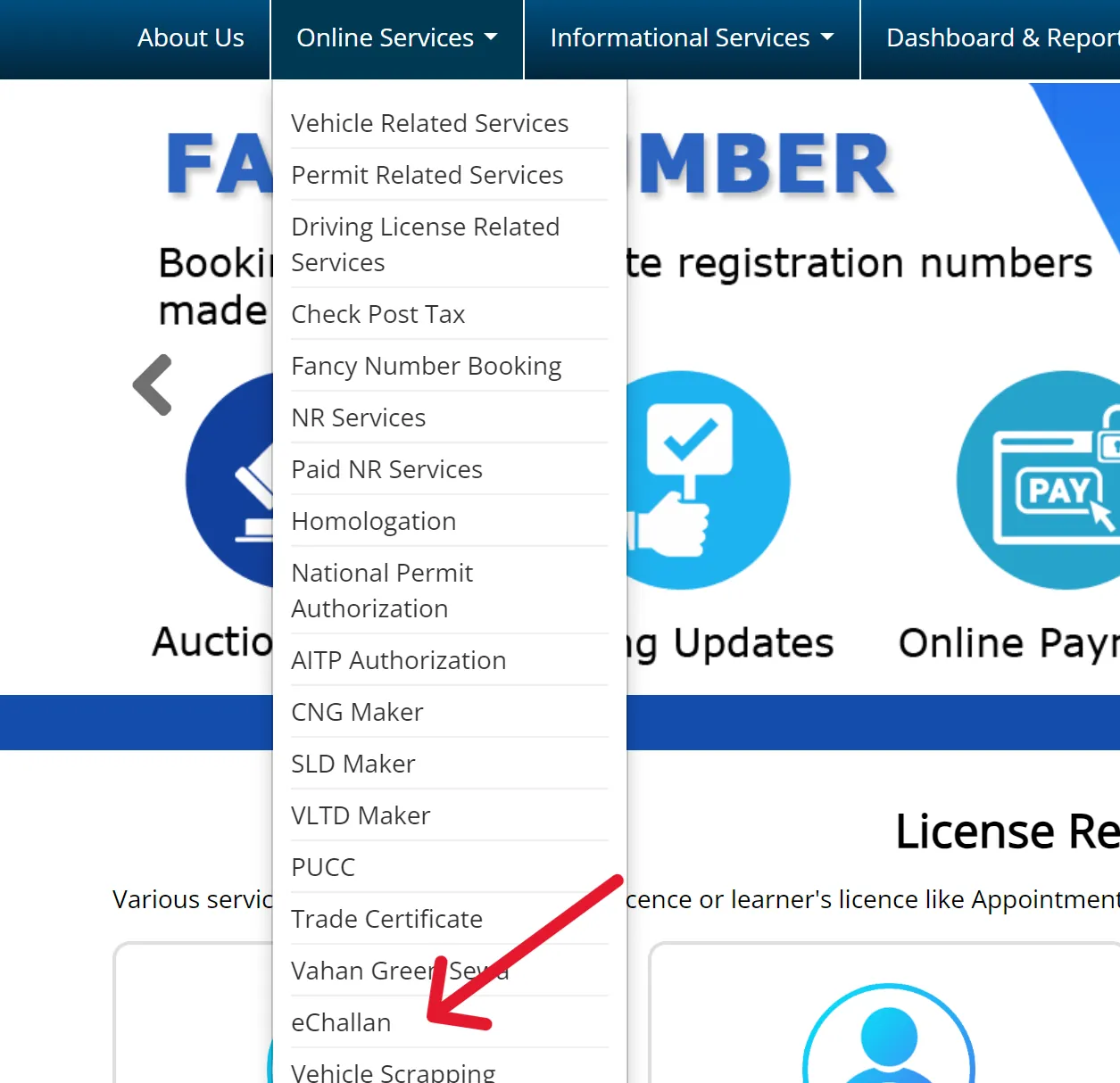
eChallan Check and Payment
The eChallan system on Parivahan Sewa allows you to check
for traffic violations and pay fines online.
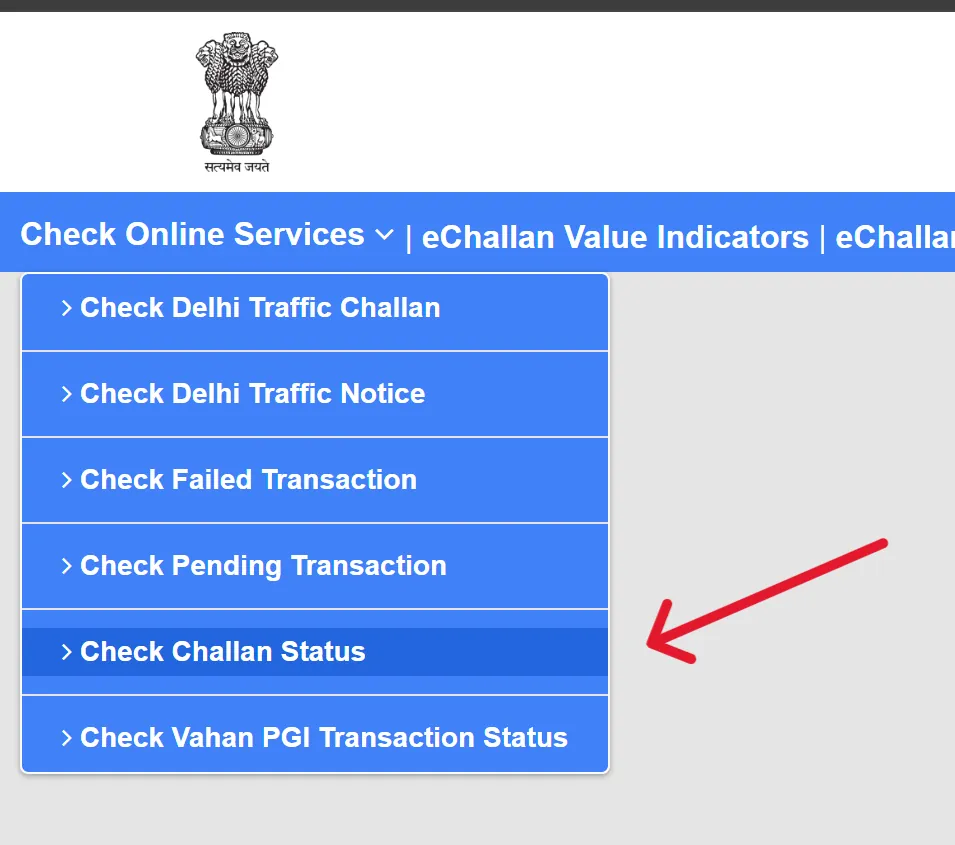
How to Check e-Challan Status:
- Step 1: Visit e-Challan Portal: Go to echallan.parivahan.gov.in.
- Step 2: Select Check Challan Status: Click on "Get Challan Details" or "Check Challan Status".
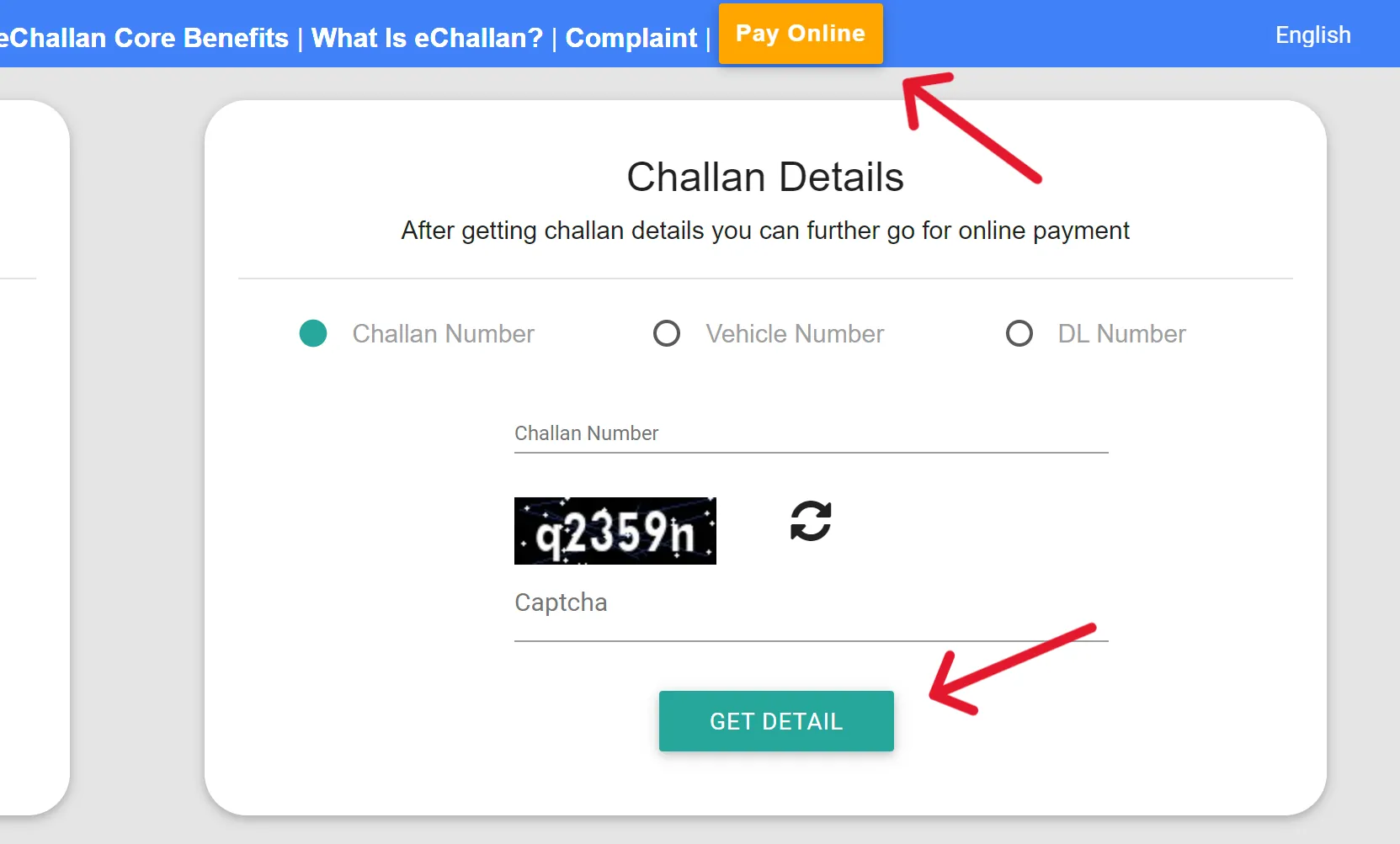
- Step 3: Enter Details: You can check using your:
- Challan Number
- Vehicle Number (with Chassis No. or Engine No.)
- Driving License (DL) Number
- Step 4: Enter Captcha: Input the security code shown.
- Step 5: Get Details: Click "Get Details" to view all pending challans against the entered information. It will show details like violation type, fine amount, and status.
How to Pay e-Challan:
- Step 1: Check Challan Status (as above).
- Step 2: Select Challan for Payment: Once the challan details are displayed, select the challan you wish to pay.
- Step 3: Click "Pay Now": Click on the "Pay Now" option.
- Step 4: Choose Payment Method: You will be redirected to a payment gateway. Choose your preferred method (Net Banking, Debit Card, Credit Card, UPI).
- Step 5: Complete Payment: Follow the on-screen instructions to complete the payment.
- Step 6: Save Receipt: After successful payment, a transaction ID and a payment receipt will be generated. Save or print this receipt for your records. You may also receive an SMS confirmation.
Common Problems & Fixes
1. Payment & Transaction Failures
This is the "Stage 1" hurdle for most users.
- The Issue: You pay, the money is debited, but the status is "Failed" or "Pending."
- The Technical "Why": The communication link between the State Treasury (e-GRAS) and the Parivahan server fails to send a "Success" flag.
- The Detailed Fix:
- Verify Pay Status: Do not restart the application. Go to Fee Payments > E-Payment > Verify Pay Status. Enter your Application Number and DOB. This manually pings the bank to update the status.
- The 48-Hour Rule: If "Verify" doesn't work, wait exactly 48 hours. Most state treasuries perform a "reconciliation" at midnight every two days.
- Refunds: If the portal doesn't update after 48 hours, the money is almost always auto-refunded by the bank. You can then safely make a new payment.
2. Document & Image Upload Errors
- The Issue: Errors like "File type not supported," "Size exceeds limit," or "Server error during upload."
- The Detailed Fix:
- Format Specs: Photos and signatures must be in JPEG/JPG. Supporting documents (ID, Address proof) should be in PDF.
- Size Optimization: Keep files between 10KB and 200KB.
- The Filename Trick: The server often rejects files with spaces or special characters. Rename
My Aadhaar Card.pdf to myaadhaar.pdf.
- DPI Settings: If a scan is rejected for being "unclear," scan it at 150 DPI. Higher DPI creates a file too large; lower makes it too blurry.
3. Aadhaar e-KYC & Data Mismatch
This is the biggest reason for "Faceless" services failing.
- The Issue: "Aadhaar authentication failed" or "Name mismatch."
- The Technical "Why": The system compares the string of text in your Aadhaar to your RTO records. Even a missing middle initial will trigger a security block.
- The Detailed Fix:
- Standardization: If your Aadhaar has your name as "Rahul S. Sharma" and the RTO has "Rahul Sharma," you cannot use the faceless service.
- The Solution: You must either update your Aadhaar to match your old license or choose the "Physical Visit" (Non-Aadhaar) route where a human officer verifies your ID.
- Mobile Link: Ensure your Aadhaar is linked to the same mobile number you are using for the Parivahan OTP.
4. Slot Booking (DL/LL Test) Obstacles
- The Issue: No dates are available (shown in Red/Blue) or the page crashes during the "Captcha" stage.
- The Detailed Fix:
- Release Timing: Most RTOs release fresh slots at 10:00 AM or 11:00 AM daily. Be logged in 5 minutes early.
- Browser Choice: Use Mozilla Firefox. It handles the government's Java-based slot scripts more reliably than Chrome.
- Avoid Mobile Browsers: For slot booking, use a desktop. The "Calendar" widget often fails to render correctly on mobile screens.
5. mParivahan App & Technical Glitches
- The Issue: "Unable to verify MPIN," "Connection Error," or "Blank Virtual RC."
- The Detailed Fix:
- The Login Loop: If the app won't log in, go to your Phone Settings > Apps > NextGen mParivahan > Clear Data and Cache. Re-login from scratch.
- Virtual RC Refresh: If your insurance is updated but doesn't show in the app, delete the Virtual RC from your dashboard and add it again using the Engine/Chassis number. It forces a fresh fetch from the National Register.
- Browser Errors (403/500): If you see "403 Forbidden" on the website, it means your IP is blocked. Turn off any VPNs or try switching from Wi-Fi to Mobile Data.
6. E-Challan "Double Verification"
Paying a challan is a three-way process: User -> Payment Gateway -> Treasury -> Police Database.
If the "Police Database" doesn't get the signal, your challan stays "Active."
The Pro Fix: The "Get Details" button on the e-Challan website acts as a "manual sync."
If you have the receipt, clicking this button forces the Police server to re-query the Treasury for your specific Transaction ID.
Contact Details
FAQ's
1. What is Parivahan Sewa Portal?
Parivahan Sewa is an official online platform by the Ministry of Road Transport and Highways (MoRTH), India, providing various digital services related to vehicle registration and driving licenses to make RTO processes convenient and transparent.
2. How can I apply for a Learner's License (LL) online?
Visit sarathi.parivahan.gov.in, select your state, choose "Apply for Learner Licence," fill the form, upload documents, pay fees, and book a slot for the online LL test.
3. How can I check my Driving License (DL) application status?
Go to parivahan.gov.in, select "Driving Licence Related Services" for your state, then click "Application Status" and enter your application number and date of birth.
4. Can I renew my Driving License (DL) online through the portal?
Yes, you can initiate the renewal process online by visiting parivahan.gov.in, selecting "Driving Licence Related Services," choosing "Apply for DL Renewal," and following the steps for form submission, document upload, and fee payment.
5. What documents are generally required for a Driving License application?
Commonly required documents include proof of age (e.g., Birth Certificate, Aadhaar), proof of address (e.g., Aadhaar, Passport, Utility Bill), and Form 1 (self-declaration of physical fitness).
6. How do I pay an e-Challan online?
Visit echallan.parivahan.gov.in, choose to check by Challan Number, Vehicle Number, or DL Number, view the challan details, and then select the "Pay Now" option to complete the payment online.
7. Is it mandatory to visit the RTO after applying for a Driving License online?
For a Permanent Driving License, a physical visit to the RTO is mandatory for the practical driving test. For some services like Learner's License in certain states, the test might be online, reducing RTO visits.
8. Can I download a digital copy of my Driving License from the portal?
Yes, you can access and print a copy by going to "Driving Licence Related Services" -> "Print Driving Licence" on the portal. Additionally, digital copies are available on the mParivahan app and DigiLocker.
9. What is the validity period for a Learner's License (LL)?
A Learner's License is generally valid for 6 months from the date of issue. You must apply for a permanent DL within 30 to 180 days of obtaining your LL.
10. What if I lose my Driving License? How can I get a duplicate?
You can apply for a duplicate DL online via the Parivahan Sewa portal by selecting "Apply for Duplicate DL." You will typically need to submit an FIR copy (if stolen/lost) along with other documents.